There’s a simple way to render a UIView into a UIImage: use the view’s layer, and render it into a bitmap graphic context. Here is the code, phrased as a UIView category:
#import "UIView+RenderUIImage.h" #import@implementation UIView (RenderUIImage) - (UIImage *)renderAsImage { // setup context UIGraphicsBeginImageContextWithOptions(self.bounds.size, NO, 0.0f); // use same scale factor as device CGContextRef c = UIGraphicsGetCurrentContext(); // render view [self.layer renderInContext:c]; // get reslting image UIImage *result = UIGraphicsGetImageFromCurrentImageContext(); UIGraphicsEndImageContext(); return result; } @end
Just remember to link the QuartzCore.framework and you’re good to go.
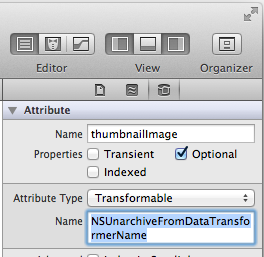 There is an easy but little known way to store many kinds of UIKit objects in CoreData without writing any code. It works for UIImage, UIColor, UIBezierPath, MKPlaceMark, NSDate, and any other class that conforms to the NSCoding protocol.